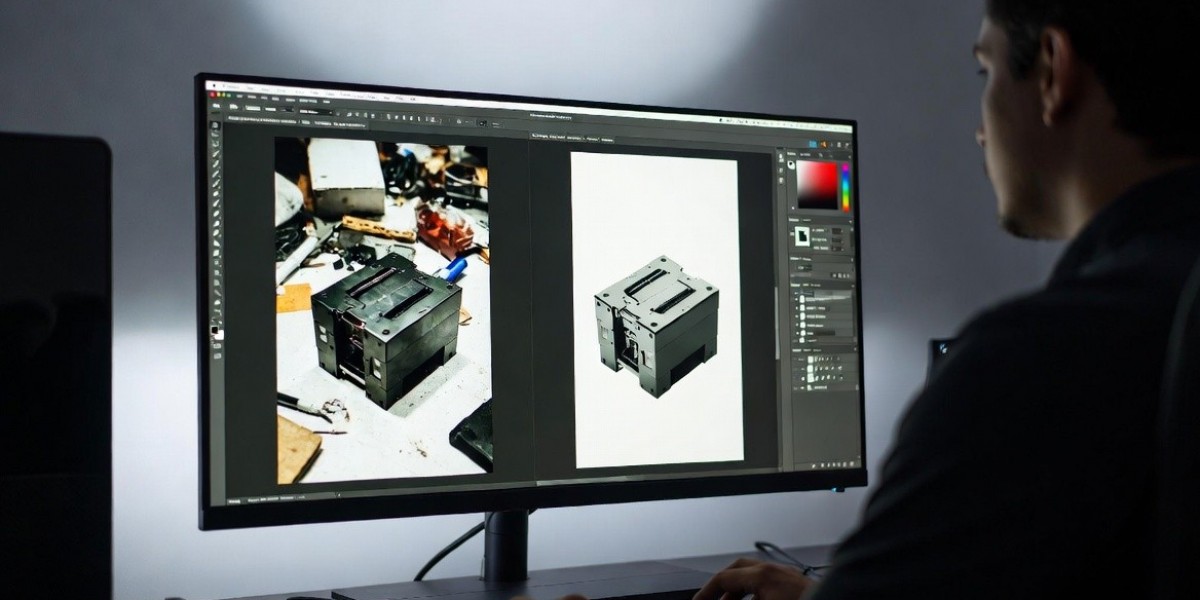

A cluttered or distracting background can instantly reduce the impact of an otherwise great image. Whether you’re selling products online, creating marketing visuals, or building a professional portfolio, clean and focused imagery is essential. This is where Background Removal Editing becomes a game-changing technique.
By isolating the subject and removing unwanted backgrounds, you can create sharp, distraction-free visuals that highlight what truly matters. From ecommerce product photos to portraits and advertisements, background removal helps maintain consistency, improve visual appeal, and increase engagement.
In today’s digital landscape, where attention spans are short and competition is high, polished images make a strong difference. According to ecommerce insights from platforms like Shopify, clean product visuals significantly influence purchasing decisions. In this guide, you’ll learn expert techniques, tools, and workflows for Background Removal Editing to create high-quality images that stand out.
What Is Background Removal Editing?
Background Removal Editing is the process of separating the main subject from its background and either removing or replacing it with a clean, suitable backdrop.
This technique is widely used across industries such as ecommerce, photography, advertising, and graphic design. The goal is to enhance focus, improve consistency, and create visually appealing images.
Core Objectives:
- Isolate the subject accurately
- Remove distractions from the background
- Maintain clean edges and natural look
- Ensure consistency across images
Common Uses:
- Ecommerce product listings
- Portrait photography
- Marketing and advertisements
- Social media visuals
Why It Matters
Clean visuals help audiences focus on the subject without distractions. Studies in visual marketing show that simple, clear images can significantly improve engagement and conversion rates.
Key Techniques in Background Removal Editing
1. Clipping Path Technique
Clipping path is one of the most precise methods used in professional editing.
Best for:
- Products with hard edges (shoes, electronics, furniture)
Advantages:
- Clean and sharp edges
- High accuracy
- Ideal for ecommerce platforms
2. Layer Masking
Layer masking is used for complex subjects with soft edges.
Best for:
- Hair, fur, or transparent objects
Benefits:
- Preserves fine details
- Allows flexible adjustments
- Produces natural-looking results
3. AI-Based Background Removal
AI tools have made background removal faster and more accessible.
| Tool Name | Key Feature |
|---|---|
| Remove.bg | Instant background removal |
| Adobe Express | Quick automated editing |
| Canva | Easy drag-and-drop removal |
Note: AI tools are fast but may require manual refinement for professional results.
4. Edge Refinement and Cleanup
After removing the background, refining edges is essential.
Focus Areas:
- Smooth jagged edges
- Remove color fringing
- Maintain natural transitions
5. Background Replacement
Replacing the background can enhance the overall look and branding.
Popular Options:
- Pure white for ecommerce
- Gradient or solid colors
- Lifestyle or contextual backgrounds
Tools Used for Background Removal Editing
Professional Software:
- Adobe Photoshop – Advanced editing and precision tools
- Adobe Lightroom – Basic adjustments before editing
- Capture One – High-quality RAW processing
Additional Tools:
- Remove.bg – Fast background removal
- Canva – Simple design and editing
- Fotor – Quick online editing
Step-by-Step Background Removal Editing Workflow
Step 1: Select the Subject
Use selection tools like Pen Tool, Quick Selection, or AI selection.
Step 2: Remove the Background
Apply clipping path, masking, or automated removal.
Step 3: Refine Edges
Clean up edges and ensure smooth transitions.
Step 4: Adjust Colors and Lighting
Match the subject with the new background if replaced.
Step 5: Add Shadows and Depth
Create natural shadows for realism.
Step 6: Final Optimization
Resize, sharpen, and export the image for its intended use.
Common Mistakes to Avoid
- Rough or jagged edges
- Overuse of AI without manual correction
- Mismatched lighting between subject and background
- Ignoring shadows and depth
- Using low-resolution images
Benefits of Professional Background Removal Editing
Why It Matters:
- Improves visual clarity and focus
- Enhances brand consistency
- Increases conversion rates in ecommerce
- Creates professional-looking images
- Saves time in bulk image editing
Clean and consistent visuals help build trust and improve user experience.
FAQs About Background Removal Editing
What is background removal editing?
Background removal editing is the process of removing or replacing the background of an image to highlight the main subject.
Which tool is best for background removal?
Adobe Photoshop is the most precise tool, while AI tools like Remove.bg are faster for simple tasks.
How long does background removal take?
It can take a few seconds with AI tools or up to 30 minutes for complex manual editing.
Can beginners do background removal editing?
Yes, beginners can use AI tools or simple software, but professional results require practice.
Why is background removal important in ecommerce?
It helps create clean, consistent product images that improve customer trust and increase sales.
Conclusion: Enhance Your Visuals with Background Removal Editing
Background Removal Editing is an essential technique for creating clean, professional, and high-impact images. Whether you’re working on ecommerce products, marketing visuals, or photography projects, removing distractions allows your subject to stand out.
By using the right tools and techniques—such as clipping paths, masking, and edge refinement—you can achieve high-quality results that improve both aesthetics and performance.